Evidence · Scope · Walkthroughs

What the demos show.
What they don’t.

Transparent status · No client claims

This page separates design artifacts and local file checks from deployed or tested outcomes. Diagrams are architecture illustrations, not screenshots of cloud resources. No Azure or AWS resources were deployed while preparing this portfolio.

Execution status at a glance

Azure secure foundation

Designed: VNet, app/data subnet boundaries and explicit inbound deny rule.

Built: Bicep starter and accompanying architecture illustration are included in the downloadable kit.

Checked here: Source and archive contents were reviewed for inclusion. The Bicep CLI is not installed in this workspace, so template compilation and deployment were not validated.

Untested: Azure deployment, effective NSG behavior, connectivity, identity controls and teardown.

Open Azure walkthrough

AWS private static site

Designed: HTTPS delivery via CloudFront and Origin Access Control to a private S3 origin.

Built: Terraform starter, sample page and architecture illustration are included in the downloadable kit.

Checked here: Source and archive contents were reviewed for inclusion. Terraform is not installed in this workspace, so formatting, validation and planning were not run.

Untested: AWS deployment, anonymous S3 denial, CloudFront TLS behavior, costs and cleanup.

Open AWS walkthrough

Local web assessment lab

Designed: A localhost-only workflow for an intentionally vulnerable training target, with scope, evidence and report templates.

Built: Compose file, scope worksheet, report template and workflow illustration are included in the kit.

Checked here: The Compose file declares a loopback-only port mapping. Docker is not installed in this workspace, so the container was not started and no target was tested.

Untested: The training app, actual vulnerabilities, screenshots, remediation and retest.

Open lab walkthrough View illustrative report
Short walkthrough: Azure foundation

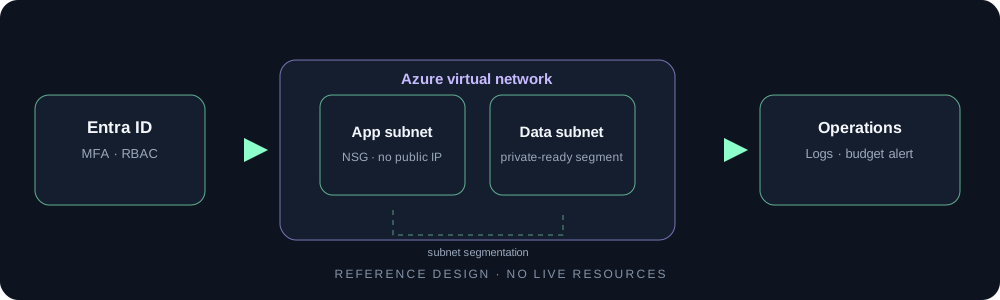
Goal: prepare a small network foundation without adding compute or monitoring resources that could create ongoing charges. Design: an Azure VNet contains separated app and data subnets; an NSG is associated with the app subnet and an explicit inbound Internet deny rule is included. Identity, workloads and diagnostics are shown as operating considerations, not resources provisioned by the template.

Illustrative Azure foundation architecture diagram, not a deployment screenshot
  1. Review address ranges, region and existing network overlaps.
  2. Inspect the Bicep template and run a deployment preview in a disposable, approved subscription.
  3. After validation, apply only with written account-owner approval and least privilege.
  4. Verify actual subnet/NSG associations and confirm no unexpected resources.
  5. Remove the resource group and confirm cleanup; record redacted evidence before publishing a real case study.
Current result: a reference design and code starter exist. This walkthrough documents the intended process, not a completed Azure deployment or verified security result.

Screenshot and report policy

The current project images are labelled architecture or workflow diagrams. There are no screenshots of executed cloud consoles or a running security lab because those runs have not been performed here. The linked report is a fictional training example for demonstrating report format only; it is not a finding against Karan’s site, a client, or any real target. Replace it with sanitized evidence only after an authorized test and reproducible validation.